Everything your celebration needs.
Design the invitation, welcome your guests and run the day — all from the Evora app, with nothing for guests to install.
Design it your way
Templates, AI and a full editor, in Arabic or English.
Describe it to AI
Write one sentence about your event. Evora asks only for what's missing, then designs the invitation.
Templates for every occasion
A growing collection of looks for weddings, birthdays, Ramadan, Eid and more — preview any of them before you start.
A full editor
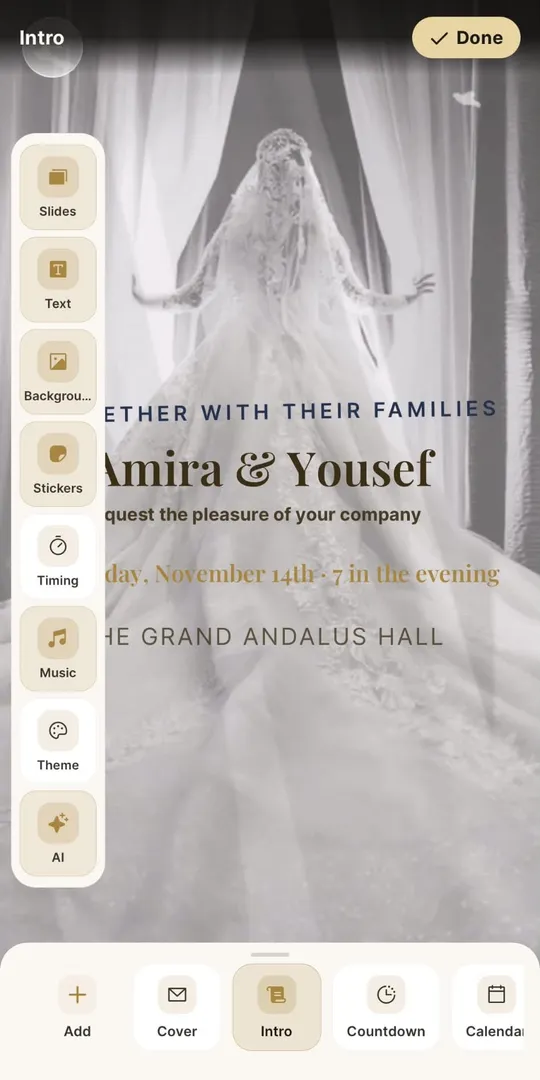
Edit text, fonts and colors, arrange slides, and add stickers and your own photos.
Motion and music
Moving backgrounds and a soundtrack that plays as guests open the invitation.
Envelope covers
Guests open a sealed envelope that unfolds into your invitation.
Arabic and English
Right-to-left layouts and Arabic typefaces made for invitations, not just translated.
Made for your guests
Everything they need opens from one link, with no app or account.
RSVP your way
Ask your own questions, allow plus-ones, set a reply-by date and cap the guest count.
Personal guest links
Give each guest their own link with the seats you reserved for them.
Private invitations
Protect an invitation with a passcode. Invitation pages never appear in search results.
Calendar and directions
One tap to save the date or open the venue in Maps.
Guestbook
Guests leave wishes on the invitation, and you choose what stays visible.
Shared photo album
Guests add their photos from the celebration for you and everyone invited.
Share it and run the day
Send it the way your guests already talk, and keep working after it goes out.
QR entry passes
Guests show their pass at the door, and you check them in from your phone.
WhatsApp, link and QR
Send it on WhatsApp, by email, as a link or a QR code, with a link preview that shows your design.
Video, PDF and image
Export a video of your invitation opening, a PDF or an image — or print it.
The day's timeline
Share the schedule, from the ceremony to the last dance.
Co-hosts
Invite family or your planner to manage the invitation with you.
Live replies
Get notified as RSVPs and wishes arrive.
Interactive “Will you…?” invitations
For dates and surprises: your guest says yes, picks a day and an activity, and their answer comes straight to you.
Ready to make yours?
Everything here is in the Evora app. Designing is free.